The Problem With Choosing a Hairstyle
Most people pick a new hairstyle by scrolling through photos of other people and hoping it looks the same on them. It usually doesn’t. Face shape, forehead size, jawline, and hair texture all affect how a hairstyle actually looks on you. What works on someone else might not work on your face.
Also read: Elon Musk’s Team Tried to Stop These 8 Websites From Being Discovered by Public
The usual options are asking your barber (who might push what’s easy to cut), using one of those hairstyle apps (most look fake), or just guessing and committing.
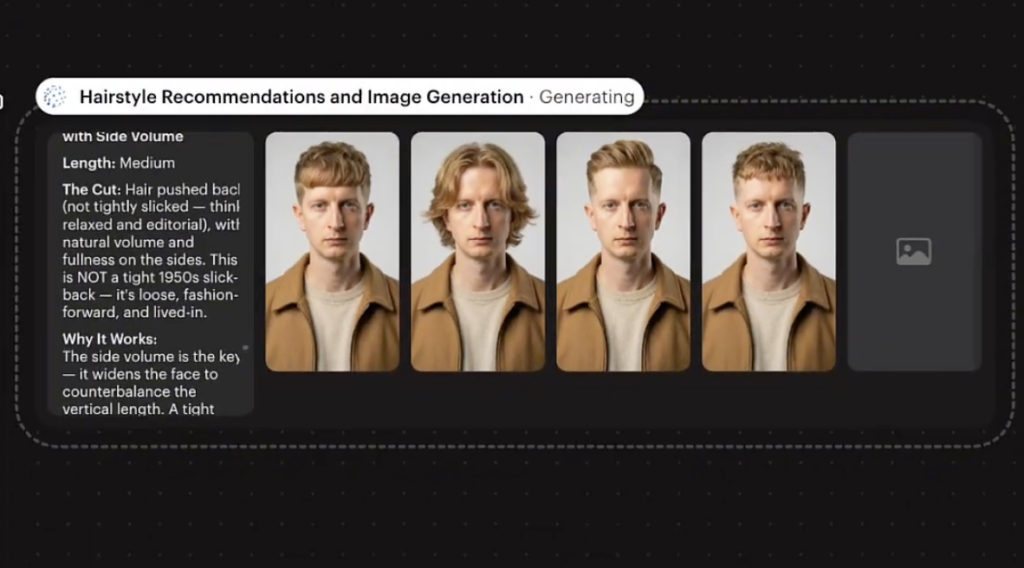
There’s a faster way. You upload your photo to Luma AI and paste one prompt. It generates multiple hairstyle options on your face from a single request. You see the results before touching your hair.
Why Luma AI
Luma AI handles this well because it can generate multiple image variations from one prompt. Instead of generating one hairstyle at a time and re-prompting over and over, you get several options in one go.
The image quality is high, the face stays consistent across variations, and it works from a single reference photo.
How to Use It
- Open Luma AI
- Upload a clear front-facing photo of yourself (good lighting, hair visible, no sunglasses) – this can be AI image of yourself as well
- Paste the prompt below
- Let it generate multiple hairstyle variations on your face
The Prompt
Here is my face photo. Analyze my face shape, forehead size, jawline, and overall hair texture.
Based on this analysis:
- Suggest at least 5 modern and trending hairstyles that will suit me best.
- For each hairstyle, explain why it matches my face shape and personality.
- Provide example hairstyle images (generated, not stock photos) so I can visualize each look.
- Also recommend whether I should go for short, medium, or long hair length.
- Add quick styling and maintenance tips for each suggested hairstyle.
Important: Along with text explanation, generate clear hairstyle example images adapted to my face photo.
GENERATE IMAGE NOW.
What You Get Back
Luma AI will generate multiple images of you with different hairstyles. Each variation uses your face as the base, so you see how each style actually looks on you, not on a model or a celebrity. The styles range across different lengths and trends, giving you a spread of options to compare side by side.
The generated images aren’t perfect every time, but they give you a solid idea of how each style would look on your specific face. Much better than guessing from photos of other people.
Tips for Better Results
Use a front-facing photo with even lighting. Side angles and shadows make it harder for the AI to work with your face shape accurately.
Keep your hair visible in the photo. If you’re wearing a hat or hood, the AI can’t assess your current hair texture or hairline.
Read more: How to Create a Viral 3D Anime Barber Video With Seedance 2.0
If you want more specific styles, adjust the prompt. Add “include a buzz cut option” or “only suggest styles that work with curly hair” or “show me options with a fade.” The more specific you are, the more useful the results.
If one variation looks close but not quite right, take that generated image and use it as a new reference. Ask Luma to adjust just that style with small tweaks like “shorter on the sides” or “more volume on top.”
You can also extend this to beard styles. Add “also generate beard style variations that complement each hairstyle” to the prompt and Luma will include those in the output.
If you want to explore more AI tools, check our homepage. Or visit the Blog for more prompts and tutorials like this one.