Copy paste these 10 prompts and turn your photos into 4K portraits, Minecraft scenes, oil paintings, anime art, time travel selfies, celebrity photos, and more.
How to Use These
Pick any photo of yourself, upload it to an AI image generator (ChatGPT, Midjourney, Luma, or similar), and paste one of the prompts below.
Read more: discover free websites on TV shows, movies, music, and more
Each prompt transforms your photo in a different way while keeping your face and identity intact. Some enhance what’s already there. Others rebuild the entire image in a completely new style.
For the best results, I recommend Nano Banana inside Freepik (Magnific) because there’s no watermark like in Gemini and you can choose the aspect ratio. If you want to test other top image models, Freepik has tons of them you can try.
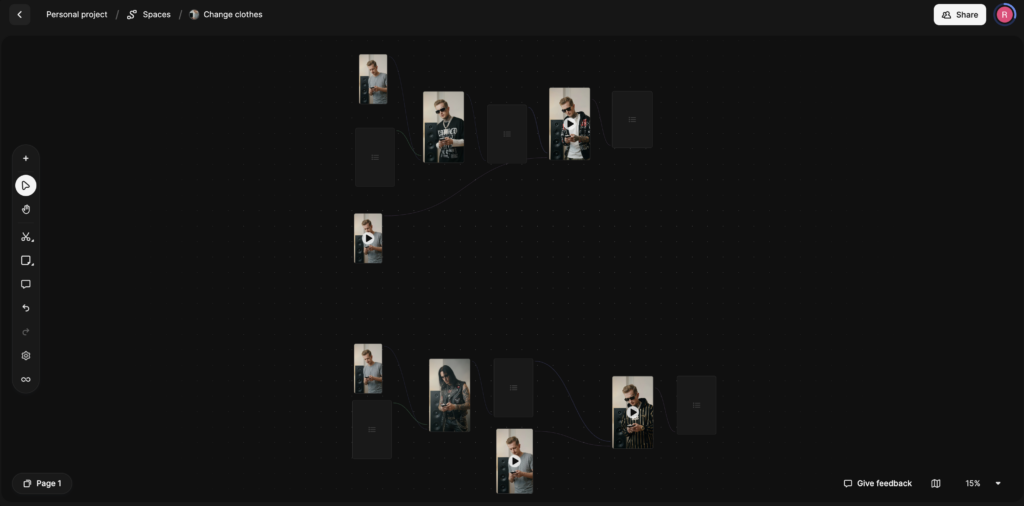
I personally like to use the Spaces feature where I can create workflows and create multiple images and videos from one place.
All 10 prompts are ready to copy and use. Steal them for free and enjoy 🙂
1. 4K Enhancement
Makes your photo sharper and more detailed without changing anything about it. No style changes, no reshaping. It recovers fine detail like pores, hair strands, fabric weave, and eyelashes. Good for cleaning up compressed images or phone photos.
Prompt: Ultra-high-resolution 4K enhancement based strictly on the provided reference image. Absolute fidelity to original facial anatomy, proportions, and identity. Preserve expression, gaze, pose, camera angle, framing, and perspective with zero deviation. Clothing, hair, skin, and background elements must remain unchanged in structure, placement, and design.
Recover fine-grain detail with natural realism. Enhance pores, fine lines, hair strands, eyelashes, fabric weave, seams, and material edges without introducing stylization. Maintain original color science, white balance, and tonal relationships exactly as captured. Lighting direction, intensity, contrast, and shadow behavior must match the source image precisely, with only improved clarity and expanded dynamic range. No relighting, no reshaping. Remove any grain.
Apply controlled sharpening and high-frequency detail reconstruction. Remove compression artifacts and noise while retaining authentic texture. No smoothing, no plastic skin, no artificial gloss. Facial features must remain consistent across the entire image with coherent anatomy and clean, stable edges.
Negative constraints: no warping, no facial drift, no added or missing anatomy, no altered hands, no distortions, no perspective shift, no text or graphics, no hallucinated detail, no stylized rendering. Output must read as a true-to-life, photorealistic upscale that matches the reference exactly, only clearer, sharper, and higher resolution.
2. Time Traveler Selfie
This one places you in ancient Egypt, taking a selfie with a pharaoh. It looks like a real iPhone ultra-wide selfie shot on location, complete with sweat, dust, harsh desert light, and slightly blown highlights on gold surfaces. The temple is fully intact, no ruins. Everything looks newly built and alive.
Prompt: Selfie, time traveler captured mid moment, arm extended naturally out of frame holding unseen phone, high angle with slight downward tilt, 0.5x ultra wide distortion, the subject and a single ancient Egyptian pharaoh standing close together both looking directly into the lens, sharing a relaxed, genuine smile as if aware of the surreal moment, the pharaoh in full ceremonial regalia with gold and lapis details catching light, posture confident but subtly leaning into frame, setting is a fully intact ancient Egyptian temple courtyard in its prime, richly painted columns, polished limestone floors, gold ornamentation reflecting harsh sunlight, servants and guards moving naturally in the background, no decay, no ruins, everything newly built and alive, handheld iPhone ultra wide feel, slight perspective stretch on facial edges and shoulders, bright overhead desert light creating hard shadows under eyes and chin, highlights slightly blown on gold surfaces, shadows crushed in deeper architectural recesses, visible skin texture with pores, light sweat sheen from heat, faint dust on arms and fabric, stray hairs catching light, linen garments creased and imperfect, warm atmospheric haze softening distant figures, subtle motion blur in background movement, slight tilt in framing, auto white balance slightly warm, mild grain in shadow areas, no visible camera device, no duplicate figures, no modern objects.
3. Professional Studio Headshot
Converts any casual photo into a clean, polished studio headshot. The kind used for casting agencies, LinkedIn, or magazine profiles. Your exact clothes and hair stay the same. Only the lighting and background change to look like a proper studio session.
Prompt: Image edit directive, convert the subject from the input photo into a clean professional studio headshot while preserving the exact clothing, hairstyle, and accessories from the original image.
Studio portrait look. Tight head and shoulders framing, centered composition, neutral confident expression, eyes directly toward camera. Professional talent headshot aesthetic used by casting agencies and magazine profiles.
Background minimal seamless light gray studio backdrop with soft falloff. No visible texture or environment.
Lighting setup high end studio beauty lighting. Large soft key light slightly above eye level, centered but angled down. Soft fill from front to remove harsh shadows. Subtle rim light behind shoulders for separation. Even illumination across face with gentle shadow under jawline. Catchlights visible in both eyes.
Camera perspective eye level. Shot on Canon 85mm f1.8 portrait lens. Crisp focus on eyes, shallow depth of field so ears and shoulders fall slightly softer.
Skin rendering realistic and professional. Natural pores visible, subtle skin texture, no plastic smoothing. Balanced color grading, neutral skin tones, clean contrast.
Hair carefully groomed but natural. Individual strands visible. Clothing preserved exactly as in the source image with accurate fabric texture, folds, and color.
Retouch level magazine professional but realistic. Remove temporary blemishes only. Keep natural facial structure, freckles, pores, and fine lines.
Final look polished agency headshot. Neutral background, balanced lighting, symmetrical framing, professional studio finish.
4. Minecraft Effect
Keeps you fully photorealistic while rebuilding the entire background as a Minecraft voxel world. Trees, paths, buildings, rocks, everything behind you becomes block-based.
You can also read this: AI Trendz Affiliate Marketing Guide To Earn $5,000+ A Month
Any animal near you turns into a Minecraft mob. Objects you’re holding become block-style versions. The perspective and framing match your original photo exactly.
Prompt: Keep the human subject 100 percent photorealistic and untouched. No pixel filter, no stylization, no lighting remap on skin. Preserve exact facial detail, pores, fabric weave, hair strands, natural shadows. Expression and posture remain identical.
Rebuild the background as a structurally accurate Minecraft voxel replica of the original location. Do not reinterpret. Match the exact layout, spacing, depth, and geometry from the reference image.
If there is a path, replicate its exact curve and width using gravel or dirt blocks. If there are trees, match trunk positions, height ratios, canopy spread using appropriate log and leaf blocks. If there are buildings, recreate their silhouette, window placement, roof angle using Minecraft block geometry. If there are rocks, benches, fences, signs, convert them into block equivalents but maintain their exact position and proportion relative to the subject.
Perspective must match the original photo perfectly. Horizon line, camera height, focal distance, framing, subject scale all identical.
Any object physically touching the subject must convert into Minecraft logic. Real animal becomes Minecraft mob equivalent. Held object becomes a block-style version scaled correctly to the hand. Objects not touching the subject remain voxel but positioned exactly where they appear in the reference.
Lighting recreated as Minecraft daylight that matches the direction and intensity of the original photo. If the reference has side light, replicate that angle with block-cast shadows. If fog exists, rebuild it using layered voxel haze while preserving the same atmospheric depth falloff.
Maintain recognizable background identity. The location should be immediately identifiable from composition alone, just rendered in cubic Minecraft geometry.
High-resolution in-engine screenshot realism. No UI, no text, no overlays.
5. Skin Enhancement Retouch
A subtle prompt that cleans up skin without making it look edited. Reduces redness and temporary blemishes while keeping pores, freckles, and texture intact. No plastic finish, no reshaping. The goal is an invisible edit.
Prompt: Skin enhancement retouch, preserve original identity and structure, refine skin texture without smoothing, maintain pores, freckles, and natural variation, reduce temporary blemishes and redness only, even out tone subtly without flattening depth, retain natural highlights and shadow transitions, keep under-eye detail intact with slight softening not removal, avoid plastic or airbrushed finish, maintain original lighting and color balance, enhance micro-contrast for realistic texture, lips and eyes untouched except for natural clarity, no reshaping of facial features, no artificial glow, no over-sharpening, seamless integration with original image, invisible edit with high realism.
6. Light and Blur Fix
Fixes dark, blurry, or low-quality night photos. Restores sharpness, removes motion blur, and replaces harsh night lighting with soft cinematic daylight. Your face, pose, and framing stay identical. The result looks like a sunlit cinematic portrait.
Prompt: Use the first image as the base image. Preserve the exact pose, camera distance, framing, facial structure, expression, and hair placement with zero alterations. Do not modify the subject’s face shape, features, hairline, or hairstyle in any way.
Transform the image from low-quality night capture into a high-quality cinematic portrait by restoring sharpness and clarity. Reduce motion blur and softness while keeping natural skin texture, pores, and fine details intact. No artificial smoothing, reshaping, or reconstruction.
Apply ethereal daylight-style lighting inspired by the reference effect image. Introduce soft, diffused sun rays entering from an upper side angle, striking the cheekbones, nose bridge, lips, and individual hair strands. Highlights should glow gently while shadows remain deep and clean, creating strong cinematic contrast.
Add subtle lens bloom, controlled light haze, and a thin atmospheric glow that wraps around the face and shoulders without washing out details. Enhance backlit stray hairs so they catch the sunlight naturally.
Render skin with luminous translucency and warm peach undertones while fully preserving original complexion and texture. No changes to identity.
Color-grade with slightly lowered saturation, warm highlights, and cooler shadows. Introduce delicate film-style grain for a refined, cinematic finish.
Keep the background exactly the same, allowing only natural sunlight flares and soft bokeh to interact with the subject. No background replacement or distortion.
Final result should feel like a soft, sunlit daydream, cinematic and ethereal, while remaining a perfect visual match to the original image in pose, scale, and identity.
7. Oil Painting Effect
Turns your photo into a traditional fine-art oil painting. Visible brushstrokes, layered pigments, canvas grain, and painterly blending. Everything stays in the same position and composition. It looks like a master painter recreated your exact photo on canvas.
Prompt: Transform the reference image into a traditional fine-art oil painting while preserving the exact composition, proportions, perspective, camera angle, lighting, and colors.
Apply realistic oil-paint textures with visible brushstrokes, layered pigments, subtle canvas grain, and smooth painterly blending. Slightly soften edges naturally, without changing any forms.
Do not add, remove, exaggerate, stylize, or alter anything. No abstraction or redesign.
The result should look like the same image carefully repainted by a master oil painter.
8. Product Ad
Takes a product from your photo and turns it into a premium advertisement composition. The product gets isolated, centered, and surrounded by its key ingredients. Clean surface, studio lighting, subtle reflections. Works for drinks, cosmetics, food products, or anything with visible ingredients.
Prompt: Product studio transformation, isolate the product from the reference image and rebuild as a premium ad composition, hero product centered and sharply in focus, surrounded by its key ingredients arranged with intention and depth, ingredients fresh and tactile, sliced, crushed, or whole depending on context, composition balanced but not perfectly symmetrical, clean surface with subtle reflections, background designed to match the product’s color palette and mood, soft gradients or tonal transitions, high-end studio lighting with controlled highlights and gentle shadow falloff, crisp edges with slight natural shadow grounding the product, micro-details visible like condensation, texture on ingredients, and fine surface imperfections, minimal but intentional negative space, no clutter beyond ingredients, polished commercial finish without looking artificial, accurate color rendering and realistic material response.
9. Famous Person Selfie
Generates a casual iPhone selfie of you next to a famous person. Replace “[famous person]” with whoever you want. The result looks like a real candid photo: uneven lighting, slight lens distortion, minor motion blur, off-center framing. Not staged, not polished.
Prompt: Raw iPhone selfie, subject from reference image and [famous person] standing close together, [famous person] appearing as most recent self with accurate hair and facial features, both leaning slightly into frame, casual shoulder-to-shoulder composition, direct gaze into camera with relaxed neutral expressions, handheld at arm’s length with slight upward tilt, soft indoor lighting mixed with phone flash causing mild overexposure on highlights and shadow falloff, natural skin texture visible with pores and subtle makeup detail, stray hairs and fabric creases present, background loosely visible with everyday environment elements slightly out of focus, minor motion blur in edges, slight lens distortion from close proximity, off-center framing with imperfect crop, subtle ISO grain and uneven white balance, unpolished, candid realism.
10. Anime Transformation
Converts your photo into detailed hand-drawn anime. Your face structure, expression, pose, and framing stay the same. Everything gets translated into anime aesthetics: clean linework, expressive eyes, defined hair strands, cel shading. The background converts into an anime environment too.
Prompt: Anime style transformation, convert the reference image into detailed hand-drawn anime while preserving exact composition, same camera angle, framing, pose, and character proportions unchanged, maintain identical facial structure and expression translated into anime aesthetics, clean linework with controlled variation in line weight, large expressive eyes styled naturally to match original gaze direction, simplified but accurate nose and mouth, hair reinterpreted into defined anime strands while keeping original shape and flow, skin rendered with smooth tonal shading and soft gradients, lighting direction and intensity preserved from original image, colors slightly stylized but faithful to source palette, background converted into anime environment matching original depth and perspective, subtle cel shading with gentle highlights, no distortion of anatomy or perspective, no change in crop or zoom, high fidelity adaptation rather than reinterpretation.
Getting Better Results
These prompts are long and specific on purpose. The detail tells the AI exactly what to preserve and what to change. If you shorten them, the AI starts guessing and the results get inconsistent.
Also read: 7 AI Tools That Took Me To $20,000 A Month
If something doesn’t look right on the first generation, regenerate before changing the prompt. Most issues are random and fix themselves on the next attempt.
You can layer these too. Start with the 4K enhancement to sharpen a blurry source photo, then run the enhanced version through any of the style prompts. A cleaner input gives you a cleaner output.
If you want to explore more AI tools, check our homepage. Or visit the Blog for more prompts and tutorials like this one.