The Viral Prompts Most AI Users Never Know
Most AI users barely scratch the surface of what modern image tools can actually do. Beyond simple filters and edits, there are advanced prompts that can completely transform posture, expressions, hairstyles, poses, clothing, and facial details while still keeping the image realistic.
These are the kinds of prompts power users quietly rely on to create cleaner, sharper, and more professional-looking photos without obvious AI editing.
Also read: 10 Super Photo Prompts That Fix Almost Any Image Problem
Here are 10 viral prompts that unlock a completely different level of AI image editing.
1. Correct Posture
This prompt subtly improves body posture while keeping the entire image natural and realistic. It adjusts shoulder position, spine alignment, and body balance without changing the person’s identity, lighting, clothing, or background. The final result looks like the same photo, just with more confident posture.
Prompt: Subtle correction of body posture. Shoulders back and down, chest slightly elevated, head naturally aligned over the shoulders. Aligned spine. Maintain natural, confident, and relaxed body language. Clothing: realistic fabric drape adjusted to the new posture. Preserve the original face, identity, background, and lighting. Final result: identical photo with improved and natural posture.
2. Change Expression
This prompt changes facial expressions naturally while preserving facial structure, identity, and lighting. You can transform a neutral face into smiling, laughing, surprised, serious, or almost any expression without making the image look artificial.
Prompt: Change the facial expression of the person in this photo to [DESIRED EXPRESSION — E.G., SMILING, SURPRISED, LAUGHING, ETC.]. Keep the person’s identity, facial features, and overall lighting intact while making the expression look natural and realistic. Ensure the adjustment blends seamlessly with the original image.
3. Clothing Color Change
This prompt changes outfit colors realistically while preserving fabric texture, wrinkles, lighting, shadows, and all non-clothing elements. The result looks like the clothing was originally photographed in the new color.
Prompt: Change the color of the outfit from [CURRENT] to [TARGET]. 100% preservation of non-clothing elements: face, skin, hair, accessories, and environment. Precise identification of fabric edges. Light interaction: maintain tonal range, highlights, shadows, and texture (denim, silk, cotton). Wrinkles and drape remain unchanged. No color bleeding onto the skin. Result: photorealistic and undetectable.
4. Fashion Visualization
This prompt transfers clothing from one image onto another person while preserving realistic fit, texture, shadows, and body proportions. It is useful for outfit previews, fashion concepts, and virtual try-ons.
Prompt: Dress the person in the first image with the clothing from the second image. Keep the person’s face, identity, expression, pose, body proportions, skin texture, hairstyle, lighting, shadows, camera angle, background, and overall photo style the same. Preserve the design, color, material, fit, and style of the clothing from the second image as accurately as possible. Make the clothing look naturally worn on the person’s body, with realistic fabric draping, folds, seams, wrinkles, texture, colors, and shadows that match the pose and lighting of the first image. Do not change the face, reshape the body, alter the pose, distort hands or limbs, warp the background, or make the clothing look fake or pasted on. The final image should look like a seamless, photo-realistic image of the same person naturally wearing the clothing from the second image.
5. Change Hairstyle
This prompt changes hairstyles while keeping the face, identity, lighting, and photo composition untouched. It generates realistic hair texture, volume, shadows, and natural blending with the original image.
Prompt: Change the person’s hairstyle in this photo to [DESIRED HAIRSTYLE, SUCH AS LONG WAVY HAIR, SHORT BOB, CURLY HAIR, STRAIGHT HAIR, PONYTAIL, BANGS, BUZZ CUT, LAYERED HAIR, SLICKED-BACK HAIR, OR SHOULDER-LENGTH HAIR]. Keep the person’s face, identity, facial features, expression, pose, clothing, skin texture, lighting, shadows, camera angle, and background the same. Make the new hairstyle look natural, with realistic texture, volume, hairline, parting, flyaways, highlights, and shadows that match the original photo. Do not change the face, alter facial proportions, distort the head or ears, over-smooth the skin, or make the hair look fake. The final image should look like a seamless, photo-realistic image of the same person with the requested hairstyle.
6. Edit Text in Images
This prompt edits text inside any image while preserving the original font, alignment, perspective, shadows, and overall design. It makes the replacement text look naturally embedded in the image.
Prompt: Edit only the text in this image by replacing [EXISTING TEXT TO REPLACE] with [NEW TEXT]. Keep the original design, layout, font style, font size, letter spacing, color, alignment, perspective, shadows, texture, and placement consistent with the surrounding text and overall image. Make the new text blend naturally into the image as if it was part of the original design. Do not change any other text, objects, people, background elements, colors, lighting, or composition. Preserve the original image style and make the edit clean, realistic, and seamless.
7. Remove Dark Circles
This prompt subtly reduces eye bags and dark circles while preserving natural skin texture, bone structure, and facial details. The result looks rested and refreshed without looking filtered.
Prompt: Subtle reduction of dark circles and eye bags from the base photo. Lighten pigmentation, soften slight puffiness, and dim shadows. Naturally blend the tone of the dark circles with the cheeks. Maintain the natural eye crease, bone structure, and expression lines. Correct only darkness and inflammation. No general beauty filters. Result: bright, rested, and natural eyes.
8. Hairline Restoration
This prompt subtly restores thinning hairlines and temple areas while maintaining natural density, color, and hairstyle consistency. The edit remains realistic and difficult to detect.
Prompt: Natural and subtle hair restoration from the base photo. Fill in temples and frontal hairline with identical color, texture, and density. Lower the hairline by 5-15mm to a natural M-shaped or rounded position. Preserve the original hairstyle, facial features, and expression. Final image: exact photo, hair subtly denser and more youthful, undetectable editing.
9. Change Pose
This prompt changes a person’s body pose while keeping their face, identity, clothing, background, and proportions consistent. The final result looks like a naturally captured photo rather than an AI-generated edit.
Prompt: Change the person’s pose in this photo to [DESIRED POSE, SUCH AS SITTING CROSS-LEGGED, ARMS CROSSED, WALKING FORWARD, JUMPING MID-AIR, LEANING AGAINST A WALL, LOOKING OVER THE SHOULDER, HANDS IN POCKETS, OR HOLDING AN OBJECT]. Keep the person’s face, identity, facial features, expression, body proportions, clothing, skin texture, hairstyle, lighting, shadows, camera angle, background, and overall photo style as consistent as possible. Make the new pose look natural, balanced, and anatomically realistic, with believable limb placement, body weight, posture, clothing folds, contact points, and shadows that match the original scene. Do not distort the face, warp the body, create extra fingers or limbs, change the person’s identity, alter the background, or make the pose look stiff or artificial. The final image should look like a seamless, photo-realistic image of the same person naturally captured in the requested pose.
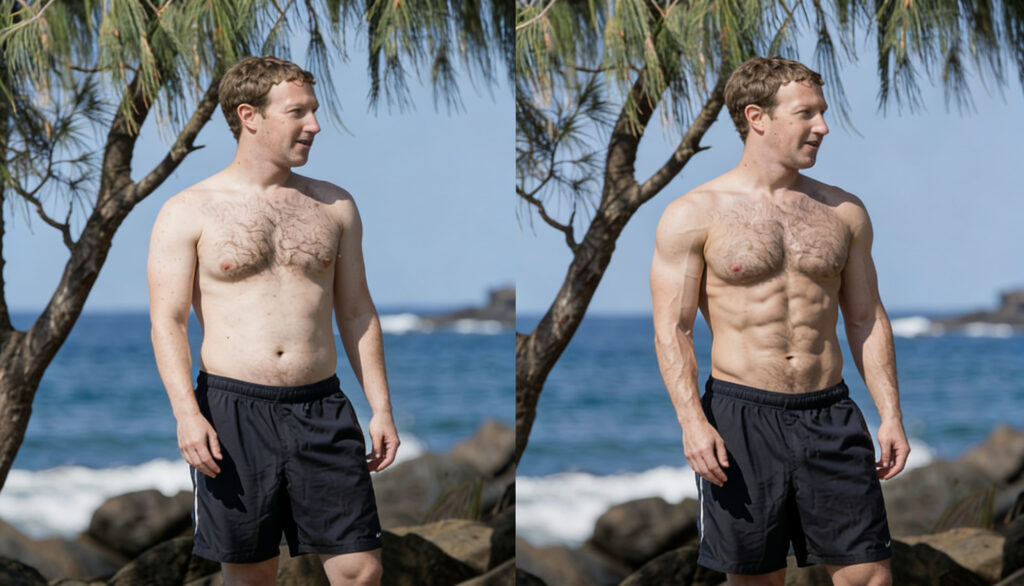
10. Body Reshape
This prompt reshapes body proportions naturally while preserving realistic lighting, anatomy, skin texture, and image consistency. It allows subtle or dramatic adjustments without obvious distortions.
Prompt: Make the body in this photo [YOUR REQUIREMENTS, EG SLIM, CHUBBY, ETC. OR RESHAPE THE BODY IN THE PHOTO INTO YOUR NEEDS, SUCH AS LONGER LEGS, SLIMMER WAIST AND MORE]. Maintain realistic proportions, natural skin texture, and consistent lighting while making the changes. Ensure the final image looks seamless and lifelike without distorting other elements or the background.
Bottom Line
These are the AI prompts that most users never discover even though they completely change what image AI tools are capable of.
Some improve realism. Others fix small imperfections or completely transform how a photo looks while keeping it natural and believable.
As AI image tools continue evolving, prompts like these are becoming one of the biggest advantages for getting professional-level results instead of average edits.
Read more: Best Affiliate Marketing Platforms in 2026: The Complete Guide for Creators and Companies
If you want to explore more AI tools, check our homepage. Or visit the Blog for more prompts and tutorials like this one.