You’ve probably seen these on Instagram and TikTok. A photo of a sports car or motorcycle on a road, and the actual Google Maps navigation route is glowing on the asphalt beneath it.
The route, the distance, the destination, all embedded into the road surface like it’s physically painted there. It looks like a high-end car ad mixed with a travel post.
Also read: 10 Most Viral Video Seedance 2.0 Prompts in 2026
It’s made with AI. You upload a car photo and a Google Maps screenshot, and the AI combines them into one cinematic image. The route gets projected onto the road in 3D perspective with realistic lighting and reflections. Here’s how to do it.
How to Create It
Step 1: Go to any platform that has GPT Image 2 model.
Step 2: Upload your images. You need at least two: a photo of your car (or motorcycle) and a screenshot of your Google Maps route. You can also add an image of a specific location or yourself if you want.
Step 3: Combine the images, select GPT Image 2 as the model, and paste one of the prompts below depending on your vehicle.
Step 4: Generate the image.
That’s it. The AI reads the route data from your Google Maps screenshot and projects it onto the road beneath the vehicle. The output looks like a cinematic travel poster.
Prompt 1: Sports Car (Ferrari)
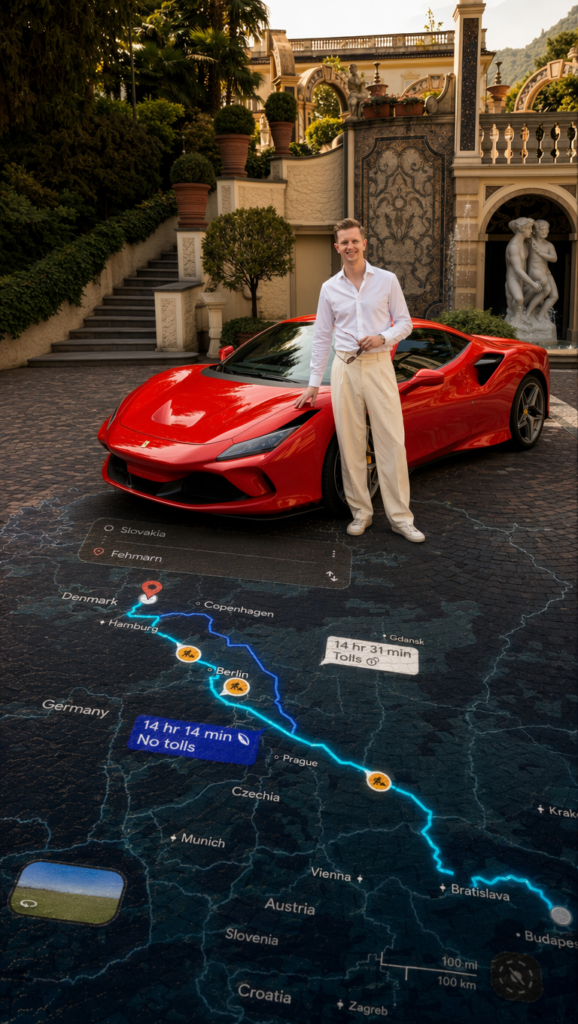
Use this for any sports car photo. Replace the route details (locations, times, passing-through cities) with whatever is on your Google Maps screenshot.
Prompt: Use the provided red Ferrari photo as the ONLY vehicle subject. Maintain the Ferrari’s identity, exact body shape, paint color, reflections, wheels, windows, badges, proportions, angle, and position EXACTLY as shown. Do NOT redesign, stylize, beautify, or alter the Ferrari in any way.
Combine the Ferrari photo with the provided navigation route screenshot into a single cinematic composition. Read all visible route data directly from the screenshot and reproduce every value EXACTLY as shown. Do NOT modify, reinterpret, approximate, or redesign any numbers, labels, route shapes, icons, road markers, map styling, or UI elements.
The real route data and navigation styling from the screenshot must appear clearly embedded onto the asphalt beneath and around the Ferrari, naturally integrated into the road perspective. The UI should feel physically painted, illuminated, or projected onto the road surface with realistic depth, asphalt texture interaction, subtle reflections, and environmental lighting. Do NOT make the UI float in the air.
Extract the route map from the screenshot and project it onto the road in realistic 3D perspective with the same exact route shape and turns:
Location: Slovakia to Fehmarn. Distance / ETA: 14 hr 14 min. Route Type: No tolls. Alternative Route: 14 hr 31 min (Tolls). Passing Through: Bratislava, Czechia, near Prague, Berlin, Hamburg, Fehmarn. Car Name: Red Ferrari.
The route must form the main glowing road path directly beneath and extending ahead of the Ferrari exactly matching the navigation screenshot. The same route should also curve subtly around the Ferrari on the asphalt, naturally framing the composition. Preserve the original bends, direction, and route geometry from the screenshot exactly.
The route must feel physically embedded into the road with realistic perspective distortion, edge glow, depth, and cinematic light spill. Never make the route holographic or floating.
Use the same bright electric-blue route glow from the screenshot for the main navigation path, with realistic light reflecting softly off the asphalt. The red destination marker pin near Fehmarn should also appear naturally integrated onto the road in perspective. Keep the map-inspired dark navigation style subtle around the asphalt surface while preserving realism.
Do NOT change the original Ferrari photo background, lighting, reflections, environment, shadows, or camera composition. Preserve the Ferrari exactly as provided. Only integrate the navigation route and route details naturally into the road and surrounding environment as instructed.
Prompt 2: Motorcycle (Harley-Davidson)

Use this for motorcycle photos. Same concept, different vehicle type. The route glow reflects onto the chrome engine parts and wheels.
Prompt: Use the provided black Harley-Davidson motorcycle photo as the ONLY vehicle subject. Maintain the motorcycle’s exact identity, body shape, matte/gloss black paint, chrome details, engine parts, wheels, handlebars, seat, reflections, proportions, angle, and position EXACTLY as shown. Preserve the rider exactly if visible. Helmet, body posture, clothing, gloves, boots, and identity unchanged. Do NOT redesign, stylize, beautify, or alter the motorcycle or rider in any way.
Combine the Harley-Davidson photo with the provided navigation route screenshot into a single cinematic composition. Read all visible route data directly from the screenshot and reproduce every value EXACTLY as shown. Do NOT modify, reinterpret, approximate, or redesign any numbers, labels, route shapes, icons, road markers, map styling, or UI elements.
The real route data and navigation styling from the screenshot must appear clearly embedded into the asphalt road beneath and around the Harley-Davidson, naturally integrated into the road perspective. The route and UI should feel physically painted, illuminated, or projected onto the road surface with realistic depth, texture interaction, subtle reflections, and cinematic environmental lighting. Do NOT make the UI float in the air.
Extract the route map from the screenshot and project it onto the road in realistic 3D perspective with the exact route shape and turns:
Location: Slovakia to Fehmarn. Distance / ETA: 14 hr 14 min. Route Type: No tolls. Alternative Route: 14 hr 31 min (Tolls). Passing Through: Bratislava, Czechia, near Prague, Berlin, Hamburg, Fehmarn. Bike Name: Black Harley-Davidson Motorcycle.
The route must form the main glowing road path directly beneath and extending ahead of the Harley-Davidson exactly matching the navigation screenshot. The same route should also curve naturally around the motorcycle on the asphalt, subtly framing the composition while keeping the rider and bike as the hero subject. Preserve the original bends, direction, and route geometry from the screenshot exactly.
The route must feel physically embedded into the asphalt with realistic perspective distortion, edge glow, road texture depth, and cinematic light spill. Never make the route holographic or floating.
Use the same bright electric-blue route glow from the screenshot for the main navigation path, with realistic blue light softly reflecting onto the road surface, wheels, chrome engine parts, and lower edges of the motorcycle. The red destination marker pin near Fehmarn should also appear naturally integrated onto the road in perspective. Keep the dark map-inspired navigation styling subtle and grounded while preserving realistic cinematic road texture.
Do NOT change the original Harley-Davidson photo background, lighting, reflections, road texture, environment, shadows, or camera composition. Preserve the motorcycle and rider exactly as provided. Only integrate the navigation route and route details naturally into the road and surrounding environment as instructed.
Prompt 3: Luxury Car (Maserati) With Golden Route

This version uses a warm golden yellow glow instead of blue for a different visual style. Works well with darker or more elegant vehicles.
Prompt: Use the provided Maserati car photo as the ONLY vehicle subject. Maintain the Maserati’s exact identity, body shape, paint finish, reflections, grille, headlights, wheels, badges, proportions, angle, and position EXACTLY as shown. Do NOT redesign, stylize, beautify, or alter the Maserati in any way. Preserve every real detail exactly from the original image.
Combine the Maserati photo with the provided navigation route screenshot into a single cinematic composition. Read all visible route data directly from the screenshot and reproduce every value EXACTLY as shown. Do NOT modify, reinterpret, approximate, or redesign any numbers, labels, route shapes, icons, road markers, map styling, or navigation UI elements.
The real navigation route and route data from the screenshot must appear clearly embedded into the asphalt road beneath and around the Maserati, naturally integrated into the road perspective. The route and UI should feel physically painted or glowing from within the asphalt with realistic depth, road texture interaction, reflections, and cinematic environmental lighting. Do NOT make the UI float in the air.
Extract the exact route map from the screenshot and project it onto the road in realistic 3D perspective:
Location: Slovakia to Saxon Switzerland Mountains. Primary Route: 8 hr 38 min (Tolls). Alternative Route 1: 8 hr 53 min (Tolls). Alternative Route 2: 9 hr 9 min (No tolls). Passing Through: Bratislava, Brno, Czechia, Prague, Saxon Switzerland Mountains. Car Name: Maserati.
The route must form the main glowing road path directly beneath and extending ahead of the Maserati exactly matching the screenshot route. Preserve every curve, bend, turn, and direction exactly as shown on the map. The route should also wrap subtly around the car on the asphalt, naturally framing the composition while keeping the Maserati as the hero subject.
The route must feel physically embedded into the road with realistic perspective distortion, asphalt depth, and cinematic light spill. Never make the route holographic or floating.
Use a vibrant golden yellow glow for the route. Rich cinematic yellow with warm highlights and bright edges. The route should look illuminated inside the asphalt itself, with soft golden reflections bouncing onto the lower body panels, wheels, and road surface around the Maserati.
The red destination pin at Saxon Switzerland Mountains should also appear naturally integrated onto the road in perspective. Keep the dark map-inspired styling subtle and realistic while preserving the raw cinematic road texture.
Do NOT change the original Maserati photo background, lighting, shadows, reflections, road texture, environment, or camera composition. Preserve the Maserati exactly as provided. Only integrate the navigation route and map details naturally into the road and surrounding environment as instructed.
How to Customize These
Change the vehicle. Replace “red Ferrari” or “Harley-Davidson” with whatever car or bike you have. Describe its color, make, and key visual details.
Read more: How to Create a Luxury Product Photoshoot With an Animal Using AI
Change the route. Replace the location, ETA, route type, and passing-through cities with whatever is on your own Google Maps screenshot. The AI reads the map data from your screenshot, but having it written in the prompt too keeps things accurate.
Change the glow color. The Ferrari and motorcycle prompts use electric-blue. The Maserati uses golden yellow. Swap the glow color to match your vibe. Green, red, purple, or white all work.
Add yourself. You can upload a photo of yourself standing next to the car and include it in the composition. Just add “include the person from the reference photo standing beside the vehicle” to the prompt.
If you want to explore more AI tools, check our homepage. Or visit the Blog for more prompts and tutorials like this one.