10 AI Photo Prompts That Actually Go Viral
Not every AI photo prompt is worth your time. After testing more than 10,000 AI generations, these 10 AI photo prompts stood out as the ones that consistently perform, the kind of transformations people stop scrolling for.
Read more: 9 GitHub Repos That Shouldn’t Be Free But They Are
Each of these AI photo prompts turns an ordinary photo into something shareable. Copy the prompt, paste it into your AI image editor of choice along with your photo, and adjust as needed.
1. Behind the Scene
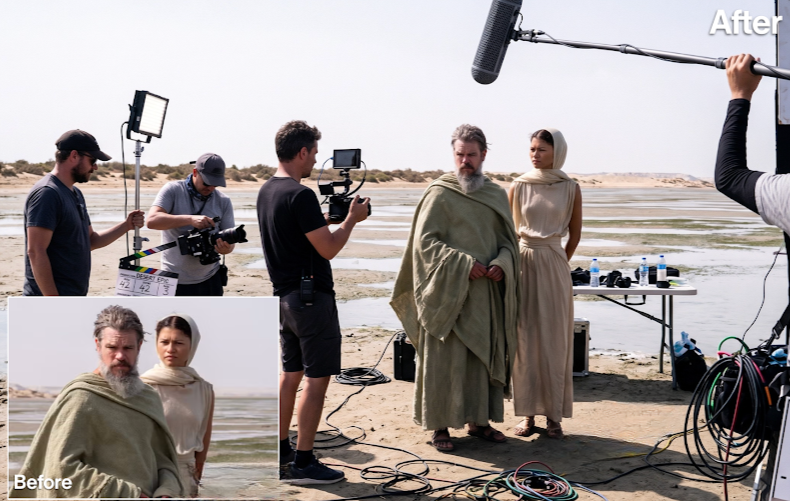
Behind the Scene turns your photo into a raw, on-set snapshot, as if a film crew were mid-shoot around the subject.
It leans into the messy realism of an actual production: boom mics dipping into frame, tangled cables, and harsh mixed lighting that reads as unpolished and authentic rather than staged.
Prompt:
Raw on-set snapshot, crew filming a scene from a movie, actors in full wardrobe, boom mic dipping into frame, tangled cables. Sony a7S III 50mm handheld, harsh mixed lighting, ISO grain, unpolished behind-the-scenes feel.
2. Polaroid
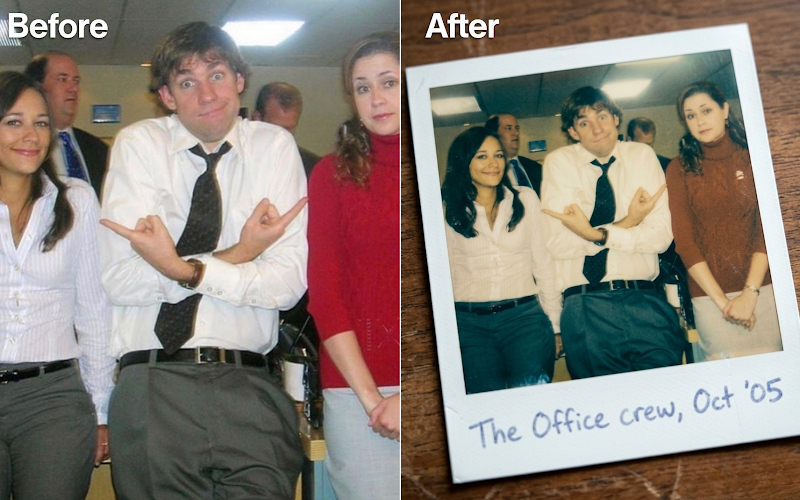
Polaroid turns a digital photo into what looks like a physical Polaroid print being photographed, thick white borders and all.
It nails the analog details that sell the effect: faded warm tones, cyan-tinted shadows, visible film grain, and soft shadows from the print resting on a surface.
Prompt:
Turn the image into a real physical Polaroid print being photographed. Thick white film borders, faded warm color response, cyan shadows, instant-film grain, held or resting on a surface with soft shadows. Analog, nostalgic.
3. Time Travel
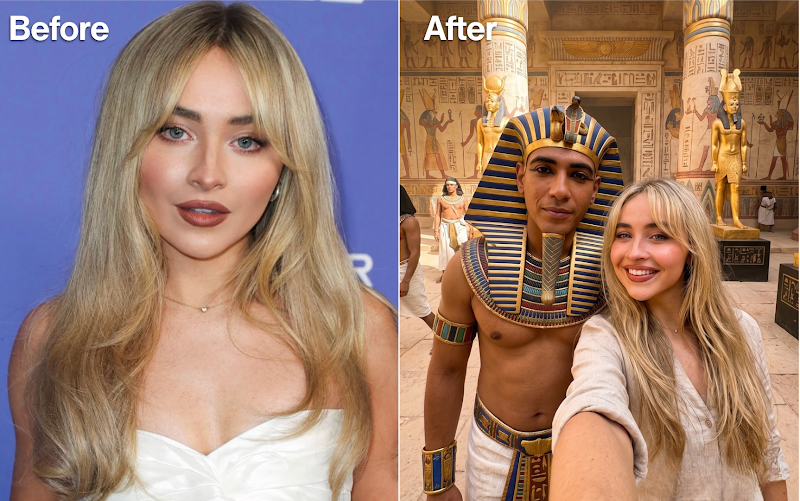
Time Travel drops the subject into a selfie with an ancient Egyptian pharaoh inside a fully intact temple courtyard, styled to look like a real photo rather than a fantasy render.
It specifically avoids decay or modern objects, aiming for candid, “time-traveler” realism instead of an obviously AI-generated historical scene.
Prompt:
0.5x ultra-wide selfie with an ancient Egyptian pharaoh in a fully intact temple courtyard in its prime, gold ornamentation, hard desert light, visible pores, warm haze. No decay, no modern objects, candid time-traveler realism.
4. Minecraft Food Effect
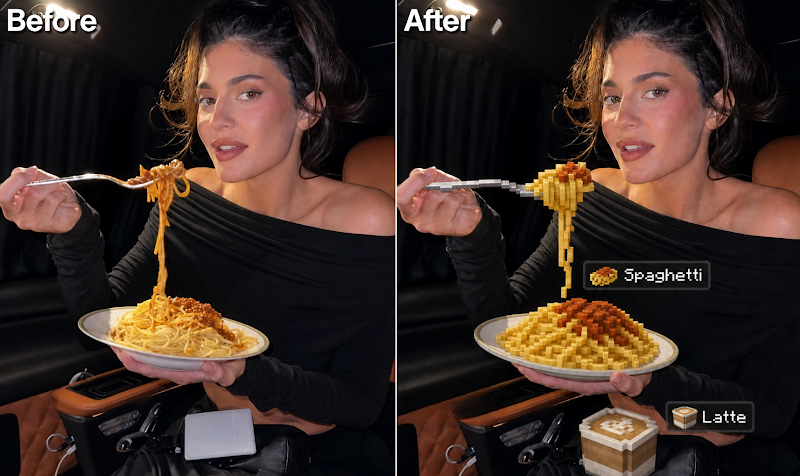
Minecraft Food Effect converts only the food and drinks in a photo into blocky, pixelated Minecraft-style items while keeping every person, face, and background element fully photorealistic.
It adds floating Minecraft-style item labels above each transformed food item, which is what makes this one so shareable, the contrast between real people and cartoonish block food does the work.
Prompt:
Transform ONLY the food and drink in the original photo into authentic Minecraft-style voxel food while keeping everything else fully realistic and untouched. The transformed food must resemble the actual food or drink in the image, converted into Minecraft items. Keep humans, skin, faces, clothing, background, furniture, and lighting completely photorealistic. Match original camera angle, composition, perspective, and environment. Use pixelated Minecraft textures, square edges, visible cube faces, low-resolution style, no smooth shading. Add Minecraft-style floating labels near each food item using white pixel font with dark semi-transparent UI boxes. Only food and drinks are transformed.
5. Paper Cutout Portrait
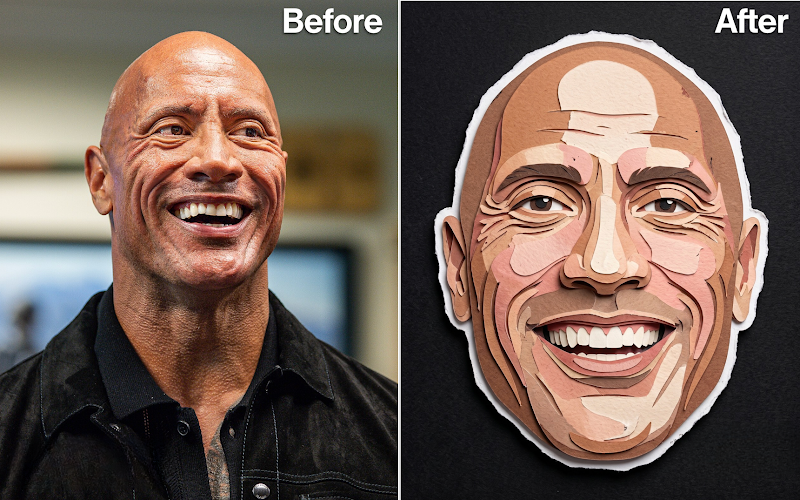
Paper Cutout Portrait isolates just the face and turns it into a paper-cut collage piece, mounted on a black textured background with an uneven white paper border.
It leans into imperfection on purpose, subtle grain, soft shadows, and print flaws, for a playful, editorial look rather than a clean digital effect.
Prompt:
Paper-cut collage portrait using only the face. Clean cutout with uneven white paper border on a black textured background, subtle grain, soft shadows, print imperfections. Playful editorial paper-cut look.
6. Paper Cutout Outfit
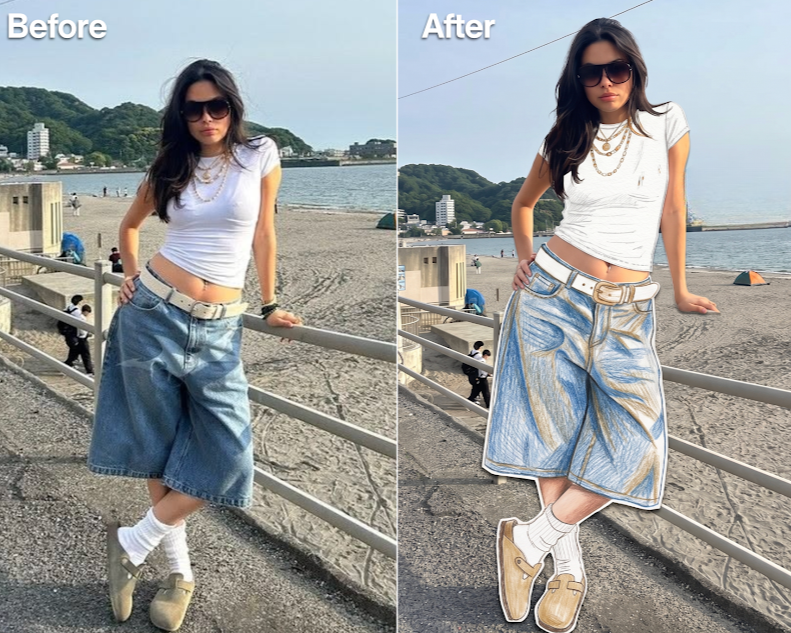
Paper Cutout Outfit keeps the face, hair, skin, and body fully photographic while transforming only the clothes, bag, and shoes into handcrafted paper pieces.
It adds visible texture details like colored pencil marks, paint scratches, and glued-on cut edges, so the outfit reads as genuinely handmade rather than digitally filtered.
Prompt:
Turn this photo into a realistic fashion editorial with handmade paper clothing cuts placed on top. Keep face, hair, skin, expression, makeup, body, lighting, shadows, and background fully photographic. Only transform clothes, bag, and shoes into handcrafted paper pieces. Add visible paper texture, colored pencil details, paint scratches, cut edges, and glued-on collage appearance.
7. Flow Effect
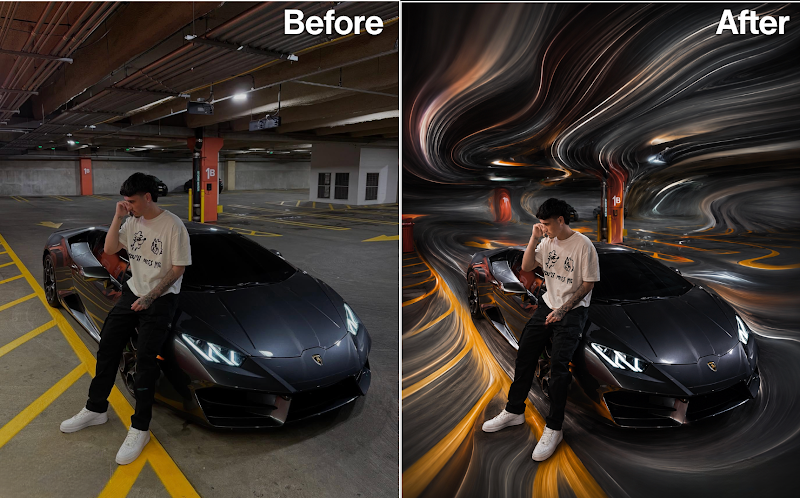
Flow Effect stretches the sky, ground, or background of a landscape photo into flowing, ribbon-like pixel trails while keeping mountains, buildings, and people completely untouched.
It pulls its color palette directly from the original image, which keeps the final result feeling cohesive and editorial rather than like a random filter dropped on top.
Prompt:
Transform the uploaded landscape into an elegant pixel stretch artwork. Keep mountains, trees, buildings, roads, people, and main subjects realistic and untouched. Stretch only sky, ground, or selected background into flowing ribbon-like pixel trails. Use extracted colors from the original image, smooth layered streaks, cinematic depth, realistic lighting, luxury editorial color grading, ultra-clean composition, ultra-realistic 8K.
8. Minecraft World
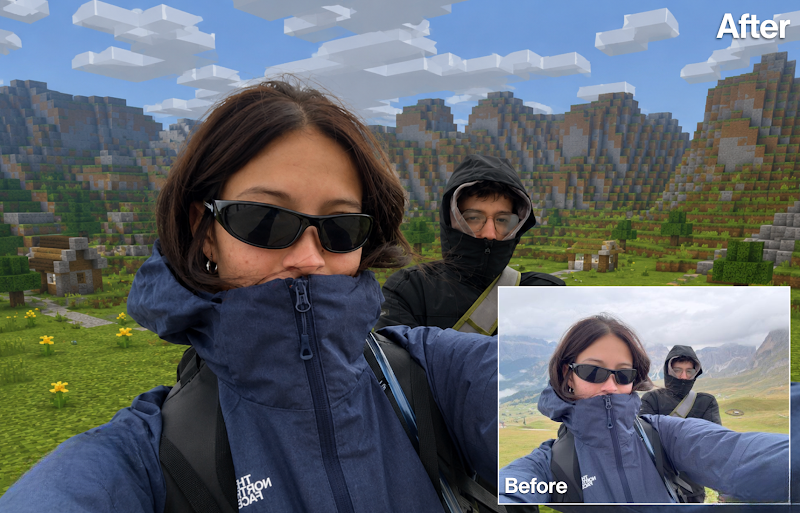
Minecraft World re-renders a photo in a painterly, animated-film aesthetic without changing the subject’s pose, action, or composition.
It only changes the rendering style, not the content, applying hand-painted textures, sculpted facial planes, and cinematic color grading on top of the exact same scene.
Prompt:
Transform the image into an Arcane-inspired painterly cinematic animated frame while preserving the exact original subject, pose, action, environment, composition, framing, and camera angle. Only change the rendering style. Use premium painterly 3D animation aesthetics, hand-painted textures, dimensional cinematic forms, stylized anatomy, expressive eyes, sculpted facial planes, painterly skin shading, detailed hair masses, atmospheric lighting, rich shadows, cinematic color grading, and handcrafted animated-film quality. Keep it as the same image translated into an Arcane-style world, not a redesign.
9. 3D Drink Spill Effect
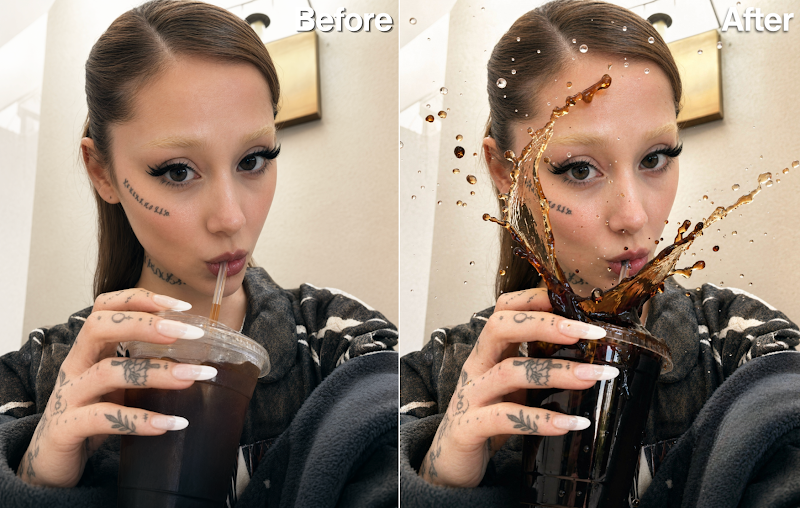
3D Drink Spill Effect freezes a drink mid-spill, with liquid suspended in the air as if time stopped.
It focuses on realistic liquid physics, droplets, and reflections while keeping the subject’s face mostly visible, so the chaos happens around the person rather than obscuring them.
Prompt:
Make the drink spill out of the cup, liquid suspended in mid-air, frozen motion effect. Keep the face mostly visible. Add realistic liquid physics, droplets, reflections, and cinematic detail.
10. White Studio Effect
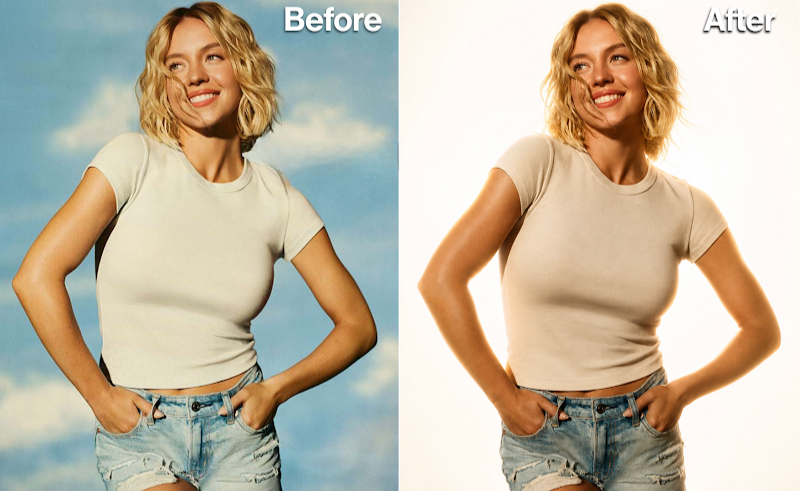
White Studio Effect swaps any background for a clean, overexposed white studio setup with strong backlighting and soft rim light around the subject’s edges.
It boosts contrast, texture, and definition for a polished, professional photography look, essentially turning a casual photo into something that looks shot in a real studio.
Prompt:
Replace the background with a clean overexposed white studio environment. Add strong backlight behind the subject, soft rim lighting around edges, increased contrast, cinematic shadows, enhanced texture and definition, soft haze atmosphere, professional studio photography style, ultra-realistic, high detail, 4K.
📸 Credit: @getintoai
Tips for Better Results
Start with a clear, well-lit source photo, since AI photo prompts work best when they have real detail to build on rather than a blurry or low-resolution original. For prompts like Paper Cutout Outfit or Minecraft Food Effect that transform only part of the image, double-check the result to make sure untouched areas, like the face, stayed fully intact. If a result looks off, try regenerating rather than settling, since small variations in output are normal with AI image tools.
Bottom Line
The prompts that go viral aren’t necessarily the most complicated ones; they’re the ones with a clear, specific transformation and tight constraints on what should stay the same. These 10 AI photo prompts consistently produce shareable results because they know exactly what to change and, just as importantly, what to leave alone.
Also read: 10 AI Websites the Internet Doesn’t Want You to Know
Save these AI photo prompts so you have them ready the next time you want content that actually stops the scroll.