How It Works
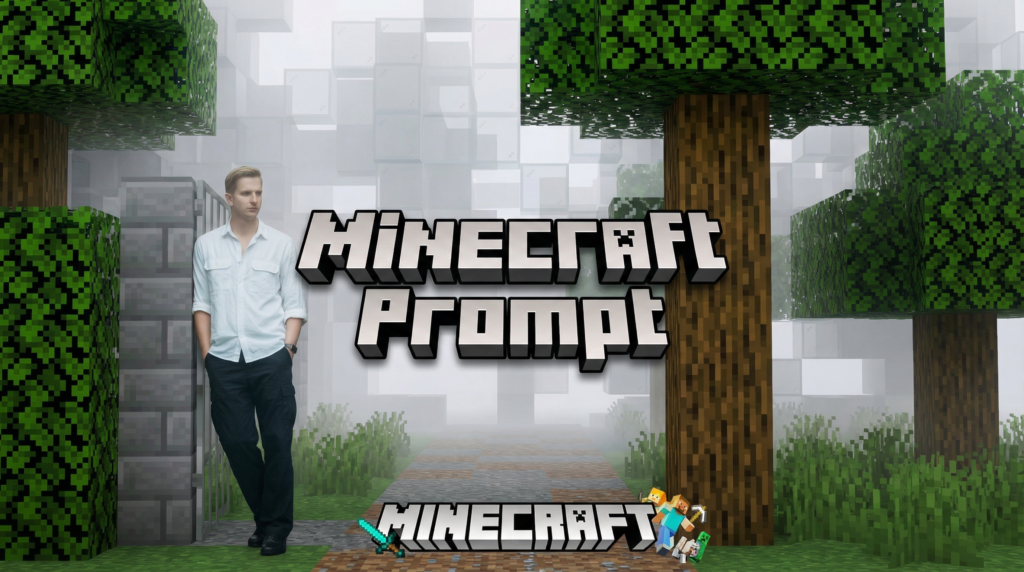
You upload a photo of yourself (or anyone) to an AI image generator and paste one of the prompts below. The AI keeps the person looking like themselves but rebuilds everything around them in the style of the game. The background, objects, lighting, all of it gets converted.
The key detail: your face and clothing stay realistic or recognizable. You don’t turn into a block figure or a random NPC. You look like you, just placed inside the game world.
Also read: Edit Videos Just By Chatting With These 13 AI Tools
These prompts work with ChatGPT (using image generation), but you can also test them in other AI image tools that accept reference photos.
How to Use It
- Open ChatGPT (or another AI image tool that supports reference images)
- Upload your photo
- Paste the prompt above
- Let it generate
If the result isn’t quite right on the first try, regenerate or add a short note like “make the background more blocky” or “keep my face more realistic.” It usually takes one or two tries to get a clean result.
Minecraft Prompt 1
This prompt keeps the person in the photo fully photorealistic while converting the entire background into Minecraft-style voxel blocks. Trees, terrain, paths, and fog all become blocky. Any pets or animals nearby get turned into Minecraft mobs (a real dog becomes a Minecraft wolf, for example).
The camera angle and framing stay the same as the original photo. The lighting matches Minecraft daylight with soft haze.
@aitrendz.xyz Here’s the prompt👇 { “task”: “image_transformation”, “style”: { “overall_aesthetic”: “High-quality cinematic Minecraft screenshot.”, “rendering_technique”: “Mixed-media: Photorealistic subject embedded in a voxel-based environment.” }, “subject_rules”: { “main_subject”: “The human person from the reference image must remain completely photorealistic and unchanged. No pixelation or block filters on their body, clothing, or face.”, “interacting_objects”: “CRITICAL: Any non-human object in direct physical contact with the subject e.g. or nearby pets dogs MUST be converted into Minecraft block models or mobs. A real dog becomes a Minecraft wolf.” }, “environment_rules”: { “background_analysis”: “Analyze the reference image background structure and recreate it entirely out of Minecraft voxel blocks.”, “elements”: “Trees, terrain, paths, and foliage must be cubic blocks with pixel art textures.”, “atmosphere”: “Replicate the foggy forest atmosphere using blocky volumetric fog layers appropriate for Minecraft.” }, “composition_and_lighting”: { “camera”: “Maintain the exact camera angle and framing from the reference photo.”, “lighting”: “Minecraft daylight with gentle haze and consistent block-based shadows.” } } Follow for more tips like this🙌
♬ original sound – René Remsik
Here’s the full prompt:
Task: Image transformation.
Style: High-quality cinematic Minecraft screenshot. Mixed-media rendering with a photorealistic subject embedded in a voxel-based environment.
Subject rules: The human person from the reference image must remain completely photorealistic and unchanged. No pixelation or block filters on their body, clothing, or face. CRITICAL: Any non-human object in direct physical contact with the subject (e.g. nearby pets or dogs) MUST be converted into Minecraft block models or mobs. A real dog becomes a Minecraft wolf.
Environment rules: Analyze the reference image background structure and recreate it entirely out of Minecraft voxel blocks. Trees, terrain, paths, and foliage must be cubic blocks with pixel art textures. Replicate the foggy forest atmosphere using blocky volumetric fog layers appropriate for Minecraft.
Composition and lighting: Maintain the exact camera angle and framing from the reference photo. Minecraft daylight with gentle haze and consistent block-based shadows.
Minecraft Prompt 2
Transform ONLY the food and drinks in the original photo into authentic Minecraft-style voxel food while keeping everything else fully realistic and untouched. The transformed food must clearly resemble the actual food/drinks in the image, converted into Minecraft items — not random Minecraft foods.
Keep:
• Humans, skin, faces, clothing, hands, background, furniture, and lighting are completely photorealistic.
• Exact original camera angle, composition, perspective, and environment.
Minecraft Food Rules:
• Convert visible food/drinks into blocky voxel versions of themselves.
• Use authentic Minecraft textures: pixelated, low-resolution, square edges, visible cube faces, no smooth shading or gloss.
• Coffee should become a pixelated Minecraft latte/coffee block while still matching the original drink.
Add floating Minecraft inventory-style labels near each food item using:
• White pixel font
• Dark semi-transparent UI boxes
• Readable placement without covering people
Lighting and shadows must match the real scene naturally.
Hard Rules:
• Only food/drinks are transformed
• No random Minecraft foods added
• Background and people remain untouched
• Labels must match the actual food shown in the image
Minecraft Prompt 3
Utiliza el 100% de la cara y el cuerpo de mi imagen de referencia. Crea una escena cinematográfica de invierno con vista cenital inspirada en una pantalla de muerte de Minecraft. La persona está tumbada boca arriba en la nieve, vistiendo ropa informal de invierno, pose realista, iluminación atmosférica fría, tonos ligeramente desaturados, huellas visibles en la nieve. Rodea a la persona con objetos pixelados flotantes o colocados al estilo de Minecraft, que incluyan una espada de diamante, un arco, un pico, una esmeralda, un bistec, un Ojo de Ender, un disco de música y una turba de arañas. Añade una superposición de fin de partida realista de Minecraft “¡Moriste!” en la parte superior con fuente de píxeles, incluyendo “Puntuación: 0”, el símbolo de la retícula y dos botones de interfaz de usuario retro etiquetados “Reaparecer” y “Pantalla de título”. Combina de forma natural la fotografía realista con elementos de juego de pixel-art. Sombras suaves, estética de invierno melancólica, ultradetallada, composición vertical, realismo DSLR, sutil profundidad de campo, alto contraste, relación 9:16.
Prompt negativo: baja calidad, cara borrosa, cuerpo distorsionado, extremidades adicionales, rasgos faciales incorrectos, cuerpo de dibujos animados, poco realista.
GTA Vice City Prompt
This one transforms your photo into a GTA Vice City scene. Your face and clothes stay the same, but everything gets the early-2000s PS2-era game look. The background converts into an 80s Miami setting with neon signs, sunset lighting, and retro colors.
Important: this prompt specifically removes all UI elements. No minimap, no health bar, no text overlays. Just a clean in-game screenshot look.
Here’s the full prompt:
Absolute preservation rule (CRITICAL): Maintain the subject’s facial identity and exact clothing from the reference image. The output must be a recognizable version of the person in the photo. DO NOT change the clothing type, color, or patterns. DO NOT change the facial features; simply translate them into the game’s 3D mesh style. DO NOT change the original aspect ratio of the input image.
Source image policy: The reference image is the primary source for character likeness and attire. Apply a “3D Game Character” filter over the existing person. The face should look like a high-quality NPC mesh from 2002, but clearly remain the same person.
Task: Transform the person in the photo into a GTA Vice City character while keeping their face and clothes intact. Recreate the background in the 1980s Vice City aesthetic. Engine style: RenderWare Engine (PS2/PC era graphics).
Style and engine constraints: Slightly simplified, low-poly geometry for the body and face. Classic early-2000s skin shaders, smooth. Vibrant 80s Miami lighting (pink/teal/orange glow). Sharp edges, no modern soft-focus or realistic bokeh. Strictly avoid photorealism, changing the person’s identity, adding modern clothing, or adding any User Interface text.
Environment: Convert the background into an 80s Vice City setting with neon signs while keeping the person’s original pose and position. Lighting should be golden hour sunset or neon-lit night, consistent with 1980s aesthetics.
Output: Strictly match the reference image aspect ratio. No cropping. No padding. Absolutely no UI elements, no minimap, no health bar, no money counter, no text overlays. Clean in-game screenshot, 2002 retro-gaming aesthetic.
Negative prompt: UI, HUD, Minimap, Health bar, Text, Logo, Changing clothes, Changing face, Different person, Photorealistic, Hyper-real, Cinematic blur, Depth of field, Changing aspect ratio, Cropping, Black bars.
Quick Tips for Both Prompts
The prompts are structured with clear sections on purpose. AI image generators respond better to organized instructions than to long messy paragraphs. Each section tells the AI exactly what to keep, what to change, and what to avoid.
Read more: 7 Viral Grok Imagine Prompts You Need To Try
If you want to adapt these for a different game style, you can use the same structure. Just swap out the environment description, lighting style, and visual references. The preservation rule part (keeping the person’s face and clothes) works the same way regardless of the game aesthetic.
Want to find more AI tools like these? Check our homepage. Or visit the Blog for more tutorials and prompts.