What These Are
These are two video prompts built for Magnific. Each one generates a 15-second cinematic sequence where you’re the main character. The first makes you look like a billionaire leaving a helipad surrounded by paparazzi and screaming crowds. The second puts you on a concert stage as a rockstar with thousands of fans.
Also read: 7 AI Tools That Took Me To $20,000 A Month
Both prompts use your uploaded face reference to keep your identity consistent across every shot. The scenes are structured with timed beats, specific camera movements, and detailed lighting instructions so the output looks like a real production.
How to Use Them
- Go to Seedance 2.0 which is available on Magnific
- Upload clear reference photos of your face (front, side, and three-quarter angles work best)
- Paste one of the prompts below
- Generate the video
Multiple face angles help the AI maintain your identity when the camera position changes between shots.
Prompt 1: The Millionaire
This prompt creates a single continuous shot from a crowd perspective. You’re a celebrity in a tailored suit walking through a crowd toward a private helicopter. Bodyguards push people back. Cameras flash. The crowd screams. You give a calm wave, adjust your sunglasses, step into the helicopter, and it lifts off into a golden sky. The whole thing is filmed with natural handheld shake like real paparazzi footage.
Main character (strict identity lock): Male celebrity (29 to 30), face matching provided reference exactly. Same facial structure, beard, hairstyle, skin tone in every frame. Calm dominant presence. Sharp jawline. Controlled expression.
Outfit: Tailored dark charcoal double-breasted suit, crisp white dress shirt, black silk tie, polished black Oxford shoes, luxury silver watch, subtle ring, premium black aviator sunglasses. Clean fitted silhouette. Elegant old-money billionaire aesthetic. No changes throughout.
Audio: Only natural environment sound. Loud crowd cheering, people shouting, camera shutter bursts, phones recording distorted audio, security yelling, footsteps, fabric movement, powerful helicopter rotor blades spinning, wind rushing, distant city ambience.
Lighting: Natural golden-hour daylight. Warm sunlight with soft shadows. Slight haze for depth. Realistic reflections on helicopter glass and metal. Dust visible in rotor wind.
0 to 3s: Handheld camera starts from inside a loud crowd behind barricades near a private helipad entrance. Slight natural shake. People in front partially block the frame with raised phones. Security guards holding the line. Crowd shouting and trying to record. Camera struggles to find a clear view toward the entrance.
3 to 6s: Camera lifts slightly above shoulder level. Focus shifts between heads, waving hands, media cameras, and glimpses of the celebrity walking forward in the distance. He is surrounded by bodyguards. Helicopter rotor already spinning behind him, wind moving suit fabric and loose dust.
6 to 10s: Security suddenly pushes the crowd back. Camera jolts naturally. Through moving gaps, the celebrity becomes clearly visible, walking confidently toward the helicopter. Suit jacket moves subtly in rotor wind. He raises one hand calmly with a slight wave. Camera tries to keep him centered while people move in front.
10 to 13s: Camera pushes slightly closer with a natural handheld zoom feel. Celebrity now near the helicopter door. Rotor blades spinning fast overhead. Dust moves across the ground. A crew member opens the helicopter door. The celebrity pauses briefly, adjusts sunglasses and cuff, turns toward the crowd with a calm expression.
13 to 15s: Camera tilts and shifts trying to follow him as he ducks and enters the helicopter. Partial view through the open door as he sits inside. Door closes. Rotor speed increases. Helicopter slowly lifts from the ground. Crowd screams louder and raises phones higher. Camera lifts abruptly as people jump to watch. Dust fills the lower frame. Helicopter rises into the golden sky. Fade to black.
Prompt 2: The Rockstar
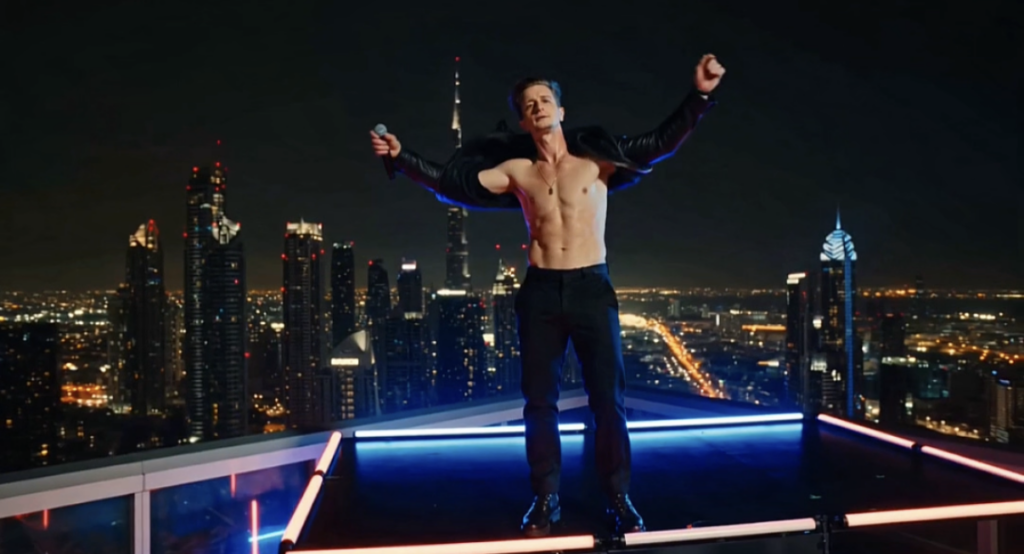
This prompt generates a high-energy music video. You walk onto a concert stage through smoke and flashing lights. Aggressive performance shots with a microphone and guitar. A slow-motion backstage walk. A rooftop performance over a city skyline at night. Fast cuts of sweat, chains, guitar strings, and a crowd reaching toward you. It ends with you sitting on a speaker stack looking into the camera.
Main character: A dangerously attractive male rock star (use provided face reference images for accurate identity, consistent facial structure, skin tone, beard, and hairstyle across all shots). Keep face locked and realistic in every frame.
Scene opening: Dramatic low-angle shot of the character stepping onto a massive concert stage through smoke and flashing lights. Black leather jacket partly open, chest slightly visible, chain resting on skin, intense eyes locked to camera, slow confident smirk. Crowd screaming with thousands of phone lights.
Performance shots: Aggressive performance shots. Character gripping microphone stand tightly, singing with raw passion, veins visible in neck, hair moving, sweat glistening on jawline and collarbone. Camera circles closely with handheld energy. Shirt opens further during movement. Electric guitar hanging low across body.
Backstage transition: Backstage hallway walk. Slow-motion swagger. Jacket slipping off one shoulder. Shirt partly unbuttoned, rings visible, sunglasses low on nose, direct flirtatious eye contact to camera while entourage follows behind.
Rooftop scene: Hard cut to rooftop night performance in a foreign city skyline. Wind blowing open shirt and jacket. He stands on a ledge platform under neon lights, chain moving, hands through hair, city lights behind him.
Fast cuts: Close-up of lips near microphone. Fingers adjusting chain on chest. Hands gripping guitar strings hard. Sweat dripping from neck. Boots stomping stage monitor. Jacket thrown off. Slow turn with sharp jawline under spotlight. Crowd reaching toward him.
Lighting: Cinematic warm amber stage lights, blue neon shadows, high contrast, glossy skin highlights, shallow depth of field, soft film grain. Dynamic camera movement, whip pans, handheld realism, slight shake, premium concert atmosphere, seductive star presence.
Ending: Hero shot of the character sitting on top of a speaker stack, shirt mostly open, chain visible on chest, one hand holding microphone loosely, looking directly into camera with a confident seductive expression while the crowd roars below.
Why These Prompts Work
Both prompts are structured with second-by-second timing, specific camera movements, and detailed scene descriptions. This gives the AI a clear sequence to follow instead of guessing what happens next.
The identity lock instructions at the top of each prompt keep your face consistent across shots. Without those lines, AI video generators tend to drift and change facial features mid-sequence.
The lighting and audio descriptions aren’t just for looks. They help the AI understand the mood and pacing of each scene, which affects how it handles motion and transitions.
Tips for Customizing
You can change the outfit, the setting, or the vehicle in the millionaire prompt. Swap the helicopter for a private jet, the suit for streetwear, the helipad for a red carpet. The crowd and paparazzi structure stays the same.
For the rockstar prompt, change the concert venue, the genre vibe, or the wardrobe. Replace the leather jacket with something else, change the rooftop city, or adjust the instrument. The performance energy and camera work carry over regardless.
Also read: Why These 10 Websites are Illegal in Most Countries
If the full 15 seconds doesn’t generate cleanly in one shot, split the prompt into two or three segments and stitch the clips together in a video editor.
If you want to explore more AI tools, check our homepage. Or visit the Blog for more prompts and tutorials like this one.