Why Grok Imagine
Grok Imagine handles detailed style prompts well. It picks up on specific lighting instructions, art styles, and composition details without losing the quality of the output.
These seven prompts are built to take advantage of that. Each one transforms your photo into a completely different style while keeping your likeness intact.
Plus the speed of generation with this AI tool is insane! It’s definitely one of the fastest tools. Upload your photo to Grok Imagine, paste the prompt, and generate.
1. Sketch Style
Turns your photo into a crayon drawing that looks like it was made by a 10-year-old. Simplified details, white paper background, and playful decorations like flowers, stars, candy, and clouds.
The result is colorful, cute, and full of childlike charm. Good for profile pictures, gifts, or just something fun to post.
Prompt: Edit the provided image and reimagine the entire scene as a crayon-style drawing. Simplify the details and make it look like it was drawn by a 10-year-old child. Do not use the original image’s colors. Give it the feeling of being drawn on a sheet of white paper, with a very cute, playful, and innocent look. Add charming childlike elements such as flowers, candy, stars, clouds, and other sweet decorative details to enhance the whimsical feel. Keep the overall result adorable, colorful, and full of childlike innocence.
2. Editorial Photo Style
Creates a high-end experimental editorial portrait. Your face is captured through a distorted glass panel that creates vertical ripple streaks across the entire image.
Also read: Best Prompts to Create Super Realistic Videos With Seedance 2.0
Golden liquid-like light reflections flow across one side of the face while the other falls into deep shadow. Solid vibrant yellow background. The look is bold, dramatic, and magazine-ready. Replace the description at the start with your own features if needed.
Prompt: A man with light-medium skin, short dark curly hair with a clean fade haircut, brown eyes, and a well-groomed short beard, facing forward in a centered symmetrical close-up portrait with a neutral expression and relaxed lips, shoulders slightly visible and body aligned straight to camera. Against a solid vibrant yellow background, captured through a vertical distorted glass or acrylic panel creating evenly spaced vertical ripple streaks across the entire face and hair, with intense golden liquid-like light reflections projected across the skin forming organic flowing patterns especially concentrated on the left side of the face while the right side falls into deep shadow. Straight-on eye-level shot, ultra-realistic photography, extremely sharp skin texture and facial details, high contrast lighting with dramatic interplay of light and shadow, warm saturated yellow and gold tones dominating the palette, experimental editorial style, no blur, no distortion in anatomy, no extra elements, no artifacts.
3. Commercial Ad Style
Generates a clean, modern product-style photo inspired by Apple advertising. You’re holding a smartphone close to camera with both hands, looking down at the screen.
Vibrant orange flowers frame the edges of the image with a soft blue sky visible behind. The lighting is diffused with subtle lens flare on the phone and glasses. Warm orange tones contrast with cool blue.
Prompt: A man with light-medium skin, short dark curly hair with a fade haircut, brown eyes, and a well-groomed short beard. Wearing transparent light-framed rectangular glasses and a beige blazer, holding an orange smartphone with triple camera lenses close to the camera with both hands while looking down at the screen with a focused neutral expression. Surrounded by vibrant orange flowers forming a circular frame around the edges of the image, soft blue sky background visible through the center, slight low-angle close-up perspective from the phone’s point of view. Ultra-realistic photography, sharp facial details and natural skin texture, soft diffused lighting with subtle glow and lens flare reflecting on the phone and glasses, warm orange tones contrasting with cool sky blue, modern aesthetic inspired by clean Apple-style advertising, no text, no distortion, no extra limbs, no artifacts.
4. Watercolor Fashion Illustration
Converts your photo into a hand-drawn fashion illustration with pencil outlines and watercolor wash coloring. Soft gradients, visible brushstroke texture, and slightly uneven fills for an authentic traditional art look.
Your clothing, hairstyle, accessories, and pose stay the same but get reinterpreted in watercolor hues. No photorealism, no anime, no digital smoothness.
Prompt: Transform the subject from the uploaded photo into a fashion illustration that perfectly matches a drawing and watercolor style.
Style and technique (strict): Hand-drawn fashion sketch look with pencil/ink outlines and watercolor wash coloring. Soft watercolor gradients with visible brushstroke texture, slightly uneven fills for an authentic traditional art feel. Minimal shading, mostly flat pastel tones with subtle darker accents for folds and hair definition. Hair illustrated with flowing pencil lines and watercolor fills, keeping a natural softness. Outfits rendered with loose, expressive linework and watercolor texture, not flat digital fills. Accessories simplified but detailed enough to match the fashion-illustration vibe. Background either plain white or light watercolor wash.
Retention requirements: Keep the subject’s original clothing, hairstyle, accessories, pose, and facial expression intact. Maintain true colors but reinterpret them in subtle watercolor hues with soft washes, never flat digital tones. Preserve details like texture of fabrics, jewelry, and hair, but in illustrated watercolor style.
Negative prompt: No photorealism, no anime/manga style, no cartoon exaggeration, no 3D rendering, no smooth digital gradients. Must stay true to hand-drawn watercolor fashion illustration style.
5. Studio Fashion Portrait
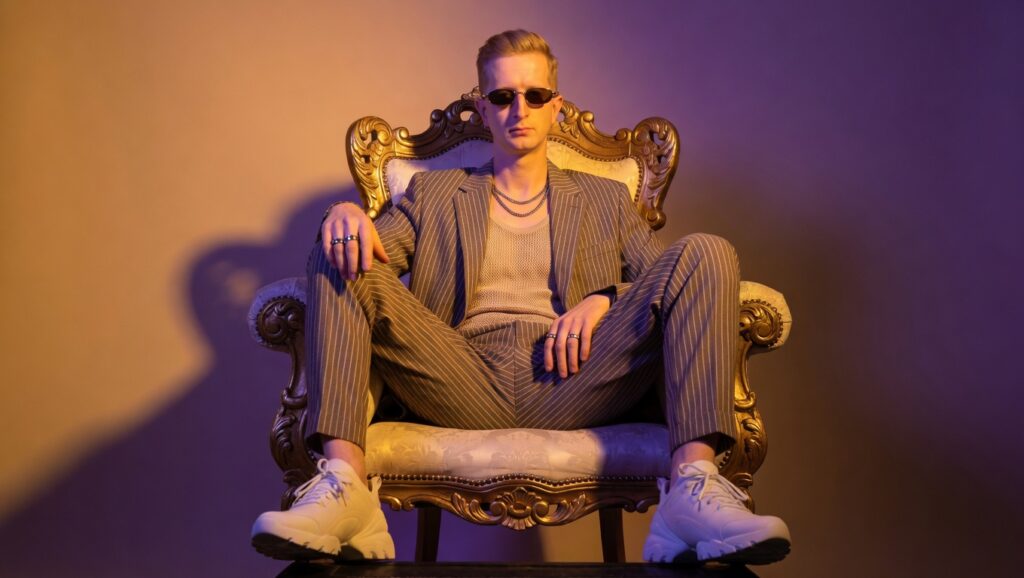
A cinematic fashion portrait where you’re seated on a baroque throne chair with a bold two-tone gradient backdrop (golden amber on one side, deep violet on the other).
The styling mixes old-world luxury with modern streetwear: a pinstriped suit paired with chunky white sneakers, stacked rings, layered chains, and retro sunglasses. The mood is commanding and elevated.
Prompt: Design a cinematic fashion portrait that oozes quiet dominance and retro-luxury flair. The subject is seated regally on a baroque-style throne chair, legs wide, posture unbothered, a vision of Gen Z aristocracy. He’s styled in a soft pinstriped co-ord suit with a relaxed fit, worn over a muted tank top, paired unexpectedly with chunky white sneakers that ground the look in modern streetwear.
Accessories are subtle yet declarative: stacked rings, layered chains, and narrow retro sunglasses elevate the energy with cool restraint.
Lighting is bold and theatrical: a vibrant two-tone gradient floods the backdrop and wraps around the subject, golden amber on one side, deep violet on the other, casting sharp-edged shadows that contour his silhouette and the ornate curves of the chair.
This contrast of opulent old-world decor with contemporary styling cues creates a hybrid aesthetic: fashion royalty meets downtown swagger. Mood: luxurious, commanding, unapologetically elevated.
6. Crowd Blur Style
A simple but striking concept. You stand still and in sharp focus while the crowd around you is captured in motion blur. The background is a busy urban environment with people moving past you. The result is a dramatic cinematic portrait where you’re the only thing frozen in time.
Prompt: Cinematic portrait of a young person standing still while a crowd moves around in motion blur. Sharp subject, blurred surroundings, dramatic urban atmosphere.
7. Red Noir Profile Picture
An extreme close-up side profile bathed entirely in searing red light. One harsh red key light from the right carves out the planes of your face while everything else falls into near-black shadow. The background is a flat vivid crimson. The look is neo-noir, tense, and poster-like. Works well as a profile picture or cover image.
Prompt: Photorealistic image of an extreme close-up side profile of this male figure, head tilted slightly downward and turned so the visible side of the head is aimed toward the right edge of the frame, occupying almost the entire vertical canvas from top to bottom, cropped tightly so the back and top of the head are out of frame, with no clothing visible.
The entire scene is dominated by searing monochromatic red tones. The subject is lit by a single harsh, highly saturated red key light coming from camera-right and slightly above, carving out bold planes of illumination along the front edge of the head while plunging the areas farther from the light into deep, nearly black shadow, producing sharp, graphic contrast.
Fine skin texture and pores rendered in ultra detail, with subtle shine and tiny imperfections and dark smudges across the surface suggesting grit and recent conflict.
Background is a completely flat, vivid crimson red with no texture or gradient, functioning as negative space that wraps closely around the silhouette of the head along the right edge and lower portion of the image.
Composition is vertical and poster-like, intensely minimalistic and focused on the dramatic curve of the profile and the sweeping diagonal of light and shadow. Neo-noir action-movie key art style, ultra high contrast, cinematic, tense and brooding atmosphere, razor-sharp focus on the illuminated areas of skin, shallow depth of field eliminating any background detail, 8K resolution, ultra-detailed, subtle film grain, studio photography look captured with a telephoto portrait lens, no text, no logos.
Tips for Using These in Grok Imagine
Some of these prompts describe a specific person (curly hair, fade haircut, brown eyes). Replace those details with your own features or upload your reference photo so the output matches you.
The shorter prompts (crowd blur, sketch style) give Grok Imagine more room to interpret. The longer ones (editorial, commercial, red noir) are tightly controlled. Both approaches work. Use longer prompts when you want a very specific result and shorter ones when you want creative variation.
Read more: 7 AI Tools That Took Me To $20,000 A Month
If the first generation isn’t right, regenerate before changing the prompt. Grok Imagine often nails it on the second or third attempt without any edits.
If you want to explore more AI tools, check our homepage. Or visit the Blog for more prompts and tutorials like this one.